Fixing Apache after Ubuntu 13.10 upgrade
Ubuntu 13.10 was released yesterday. As well as other package updates, it includes an upgrade from Apache 2.2 to 2.4, which broke a few things on my dev machine.
After the upgrade I was getting the standard "It works!" Apache message on all of my virtual hosts. Running apache2ctl configtest gave me the familiar warning:
Could not reliably determine the server's fully qualified domain name, using 127.0.1.1. Set the 'ServerName' directive globally to suppress this message
You often get this error in an out-of-the-box Ubuntu setup as you need to tell Apache what hostname to use as the default. I'd previously fixed this by creating a config file at /etc/apache2/conf.d/fqdn that contains only:
ServerName localhost
so first I had to investigate why this was no longer working. It turned that Apache 2.4 no longer reads configs from conf.d. If you check the end of apache2.conf, you'll see that it now looks in a folder called conf-enabled instead:
# Include generic snippets of statements
IncludeOptional conf-enabled/*.conf
This folder contains symlinked files pointing at conf-available, making the conf setup similar to the approach used for vhosts. So, to fix the error I moved all of my configuration files from conf.d to /etc/apache2/conf-available/, added a .conf file extension to each one, and then ran:
a2enconf fqdn
to setup the symlink.
After restarting Apache, the FQDN error was gone, but I was still getting the "It works!" message for all my vhosts. I had another look at the main Apache config and found:
# Include the virtual host configurations:
IncludeOptional sites-enabled/*.conf
So by default Apache expects the vhost files to have a .conf file extension (which it didn't before). Mine just used the hostname as the filename. So I renamed each of these and updated the symlinks that point to them.
After that everything was back to normal.
A full 2.2 to 2.4 upgrade guide is available in case you have any other issues. Of particular note is the change to the syntax for 'Deny from' and 'Require', so if you start getting "403 Forbidden" errors on things that previously worked you'll probably need to update those directives.
Many/all of these issues could be mitigaged by either keeping old configs during the upgrade or by installing the provided compatibility module, but in development I prefer to always install package maintainer's configs when upgrading so that I know how to fix things if they were to go wrong in production.
 Tags:
Tags: Some thoughts on Ubuntu's Web Apps feature
Ubuntu 12.10 introduced the "web apps" feature, which promised better integration between the desktop and certain web sites. This feature worked by way of a browser extension, which was only supported by Firefox and Chromium (not Chrome - my browser of choice at the time), and then there were installable add-ons for various popular sites.
Shortly before 13.04 was released I switched from Chrome to Chromium full-time, as I wanted to see what this feature was like to use day-to-day, and then see how it had been evolved in the new Ubuntu release, six months on. After installing 13.04, I was a little disappointed to learn that no changes had been made to this feature at all, as what's there at the moment seems very incomplete.
Looking at some of the extensions individually:
Gmail - The main thing I'd expect from this is new email notification (tied in with notify-osd). For me this worked sporadically (on perhaps 1/4 emails), but it only supports one Google Account (I'm usually logged in to at least two), and there's no way to control which one it uses. No tie-in with the Ubuntu Online Accounts feature.
YouTube - All I really wanted from this one was for it to hook into the OS sound controls, as it would be great to be able to play or pause a YouTube video by hitting the relevant media buttons on my keyboard (like I can with local videos). This one also only worked sporadically, with no obvious pattern as to why.
BBC News - This one I tried but quicky uninstalled. When you load it up it gives you a series of OS notifications for the current top news headlines (almost too quick to read). I can see the thinking behind having a notification when a new 'breaking news' story is posted, but since you need to have BBC News open in your browser anyway for this to work, it doesn't seem that useful.
Reddit - This one has an annoying bug where it incorrectly reads your Reddit 'reputation' score as the number of unread messages. So with this loaded you have a permanent blue 'new notification' icon on your desktop. If you load the app up via. the launcher (giving it its own chrome-less browser window), clicking on self.XXX Reddit links open in new tabs, but external links you click on open in your main browser window, which is a bit confusing.
I also tried the Google Docs and Google Calendar extensions - these didn't appear to do anything. Google Plus I tried - presumably this at least gives you OS notifications for G+ notifications, but for me these are so infrequent that this was tricky to test. Same goes for LinkedIn.
All in all this seems like a missed opportunity. I'm not sure if Canonical made these initial extensions with the hope that the vendors themselves would pick them up and evolve them, or whether these are all just sitting on someone's to-do list somewhere. But as everything moves into "the cloud", there seems to be a lot of potential here to further blur the lines between desktop and online apps, and provide a better experience for the user.
More than any other Ubuntu feature, I hope this gets some love in a future release. In particular, if there's a way to remove the dependency on an open browser tab (with opt-in push notifications for the various services), this could be a really awesome feature.
IE testing on Ubuntu with Microsoft's new Virtual Machine images
For a while, Microsoft provided Internet Explorer Virtual PC images that could be used to install a Virtual Machine specifically for IE testing. However, getting these running in Linux was a bit of a faff, and at times I had issues where even freshly downloaded images required a Windows activation key (making them pointless). Happily, Microsoft now has a site specifically about IE testing which includes cross-platform images to make things easier.
To use these in Ubuntu, first you'll need to install VirtualBox, which you can find in the Ubuntu Software Centre. Next, visit Microsoft's virtualization downloads page, select 'Linux' as the desired testing OS, and then 'VirtualBox' (the only option) from the platform dropdown on the right. This will give you a list of download links, grouped by Internet Explorer versions. The older IE versions, which only run on XP, have only one download link; whereas the more recent ones have several, as their image file has been split into multiple chunks. The multi-file images each have a text file download link first in the list which includes the URLs to all the file pieces. This means them very easy to download with wget:
Using the IE9 Win7 image as an example, first, download the text file itself:
wget https://az412801.vo.msecnd.net/vhd/IEKitV1_Final/VirtualBox/Linux/IE9_Win7/IE9.Win7.For.LinuxVirtualBox_2.txt
Then pass this text file to wget with the -i flag, which tells wget to download each URL it contains in succession:
wget -i IE9.Win7.For.LinuxVirtualBox_2.txt
(this might take some time depending on the speed of your Internet connection)
Once the files have downloaded, you should end up with one .sfx file and some .rar files in the folder. The next step is to make the .sfx file executable:
chmod +x IE9.Win7.For.LinuxVirtualBox.part1.sfx
and then run it:
./IE9.Win7.For.LinuxVirtualBox.part1.sfx
this will merge the files into one .ova file. OVA is a standard for self-contained virtual machine images which VirtualBox supports.
Next, run VirtualBox, and select 'Import Appliance' from its file menu:
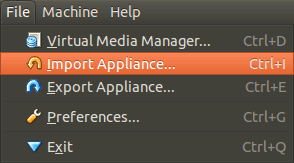
find the .ova file on your hard disk, and when it's opened, click on the highlighted 'Open Appliance' button in the main VirtualBox. This will create the new Virtual Machine which you can then run. That's it - no partitioning required, and you can now test websites using Internet Explorer.
Apparently these images are 90-day limited, although this isn't mentioned on the site. I'm not sure if this is 90 days of use or 90 days from when you first boot up the machine. I also had trouble with some of the images on there, so if you get any cryptic errors give one of the other versions a try.
Speeding up phpMyAdmin
Here's a quick tip for speeding up phpMyAdmin when using it on a remote server. A big drain on rendering speed for the app seems to be the sheer number of theme related requests (images and stylesheets) the browser makes on every page load. An easy way around this is to use the Apache module mod_expires to send an expires header with these files, which tells the browser not to bother requesting them again for a set period. This cuts down the total requests by about 90%.
Firstly, make sure mod_expires is enabled:
sudo a2enmod expires
sudo apache2ctl restart
then open the phpMyAdmin Apache configuration file (by default in located at /etc/apache2/conf.d/phpmyadmin.conf) in your text editor of choice. You'll see an IfModule block which sets up some php values:
<Directory /usr/share/phpmyadmin>
    Options FollowSymLinks
    DirectoryIndex index.php

    <IfModule mod_php5.c>
        AddType application/x-httpd-php .php

        php_flag magic_quotes_gpc Off
        php_flag track_vars On
        php_flag register_globals Off
        php_value include_path .
    </IfModule>
</Directory>
insert the following mod_expires block below the existing </IfModule>:
    <IfModule mod_expires.c>
        ExpiresActive On
        ExpiresByType image/gif "access plus 7 days"
        ExpiresByType image/jpg "access plus 7 days"
        ExpiresByType image/png "access plus 7 days"
        ExpiresByType text/css "access plus 7 days"
        ExpiresByType application/javascript "access plus 7 days"
    </IfModule>
which should leave you with this:
<Directory /usr/share/phpmyadmin>
    Options FollowSymLinks
    DirectoryIndex index.php

    <IfModule mod_php5.c>
        AddType application/x-httpd-php .php

        php_flag magic_quotes_gpc Off
        php_flag track_vars On
        php_flag register_globals Off
        php_value include_path .
    </IfModule>

    <IfModule mod_expires.c>
        ExpiresActive On
        ExpiresByType image/gif "access plus 7 days"
        ExpiresByType image/jpg "access plus 7 days"
        ExpiresByType image/png "access plus 7 days"
        ExpiresByType text/css "access plus 7 days"
        ExpiresByType application/javascript "access plus 7 days"
    </IfModule>
</Directory>
Restart Apache (sudo apache2ctl restart) so the changes take effect.
What this does is tell Apache to send an expires header of 7 days into the future for all image, CSS and javascript files within phpMyAdmin. The initial request after the restart will be as before, but after that the browser knows that the files it got back are good for 7 days, so on subsequent requests it will only request the HTML page. You should see a noticeable speed improvement.
Normally when using mod_expires you would use a much longer expire time than 7 days, but this way if a future phpMyAdmin update does change these theme files you're less likely to get caught out.
 Comments (1)
BBC radio through Rhythmbox
Mainly for my own reference: It's possible to stream BBC radio through the 'radio' part of Rhythmbox (and this is preferable to the iPlayer because of Ubuntu's slightly flaky flash support).
To use it just add a new 'Internet radio station', e.g. Radio 1 is: mms://wmlive-acl.bbc.co.uk/wms/radio1/radio1_nb_e1s1
Comments (3)